FitnessSyncer API
This document provides an overview of the FitnessSyncer API so that you may integrate the data in FitnessSyncer with your applications. Should you have any questions, encounter any issues, or need a different interface, please contact us.
By using our API, you agree with our Terms of Use available on our site.
We will periodically make changes to this API. Changes will generally be additive, however, periodically, we may create breaking changes and will attempt to notify you with sufficient time to update your implementations. Please contact us to ensure that you are on this mailing list.
You can also use the FitnessSyncer OpenAPI Specification to generate code and some sample code, although this documentation should be used. We also have a few generated and tested implementations if needed; please contact us to get access.
Quickstart
- Create an application in the developer console, which gives you a Client Id and a Client Secret. For anything other than a personal application, please contact us.
- Send the user to https://www.fitnesssyncer.com/api/oauth/authorize with your Client Id, the scopes you need and your Redirect URL. See Authorizing.
- When the user comes back to your Redirect URL with a code, exchange that code for an access token with a POST to https://api.fitnesssyncer.com/api/oauth/access_token. See Accessing the token.
- Call the API with an Authorization header of “Bearer” followed by the access token. Listing the user’s sources is a good first call:
curl -H "Authorization: Bearer AccessToken" https://api.fitnesssyncer.com/api/providers/sources/Introduction
FitnessSyncer’s API provides access to health and fitness data from over 50 sources as displayed within the FitnessSyncer Stream and FitnessSyncer Dashboard, including data sources such as Fitbit and data captured in FitnessSyncer Notebook.
The first step in integrating with the FitnessSyncer API is to authenticate. Authentication is done via the OAuth2 protocol and once the user grants permission to your application to access their information, FitnessSyncer will provide you with a token that you can use for your requests. The permissions are acquired via scopes and it should be noted that a user can grant your application a subset of those scopes.
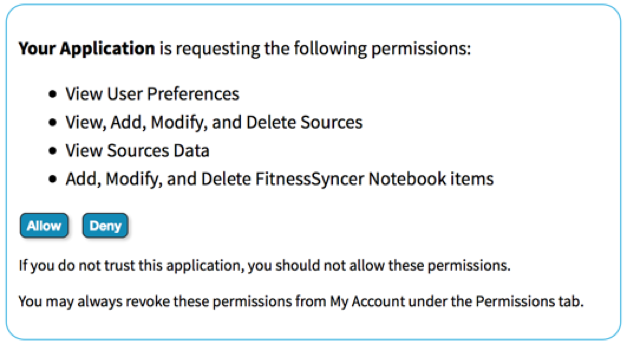
Once authenticated, your application can then access any data in FitnessSyncer or upload data into FitnessSyncer.
Most applications will interact with a Source, which is a feed from one data provider for a type of data. A Data Provider is the application or hardware that provides data and data-types such as Activity Tracking, Exercise, Allergies, Weight, Blood Pressure, Cholesterol, Condition, Cycle Tracking, Glucose, Medications, Nutrition, Oxygen, Sleep, and Temperature data.
For example, if a user has a Fitbit device from which they track Exercise and Sleep information, this will result in two Sources, one for the Exercise from Fitbit, and the other for Sleep Information from Fitbit.
FitnessSyncer also provides Destination Tasks. Destination Tasks complete operations such as synchronize the data into other services, provide e-mail notification, automatically refresh sources on a schedule, etc. These are also available within this API.
When FitnessSyncer has new data, consumers of our API will need to read that new data in. A subscription allows a webhook to be sent to you when there is new data. If you wish to use this, please contact us.
FitnessSyncer free accounts are limited to the number of sources and destinations they may create. Please contact us if this is an issue.
Typical Workflows
The typical workflow for integrating with the FitnessSyncer API is as follows:
- Authenticate with FitnessSyncer
- Optionally Create a Data Source, set Authenticate the Data Source, and Refresh the Data Source.
- Optionally Create a Destination (Such as a Refresh Source)
- Optionally Create a Notification (or push or pull)
- List your data sources to get the raw data
- Optionally Create or Manage Leaderboards
- Optionally Get Dashboard Data
Documentation Sections
- AuthenticationAuthorizing your application with OAuth2, the scopes it can ask for, and refreshing and revoking its tokens.
- User PreferencesReading and updating a user’s preferences, such as units, time zone and heart rate zones.
- Data SourcesListing, creating, updating, deleting and refreshing the sources a user reads data from, and their sync status.
- Data Source ItemsListing, reading, creating, updating and deleting the items a source holds, and uploading fitness files.
- Destination TasksListing, creating, updating, deleting and running the tasks that send a user’s data somewhere.
- ProvidersThe services FitnessSyncer connects to, how each one authenticates, and the cloud storage file formats.
- FitnessSyncer NotebookReading the items a user has entered into the FitnessSyncer Notebook, and the Notebook’s categories.
- NotificationsBeing told when a user’s data changes, by webhook or by polling, and verifying the requests we send.
- Descriptions APIReading the human-readable descriptions of the values an item can hold.
- Leaderboards APICreating and running Leaderboards, inviting users to them and reading their results.
- Dashboards APIRequesting the data behind a user’s Dashboard charts.
- FitnessSyncer for ResearchersListing the participants of a research study.
- Chart AnnotationsListing, creating, updating and deleting the notes a user has written on their charts.
- Data TypesThe objects several of the APIs share, such as the item wrappers, provider configuration, sync status and errors.
- Item TypesEvery kind of item FitnessSyncer holds, from activities to temperatures, and the fields they share.
- ConventionsDaily summaries, character sets, languages, compression, rate limits, errors and API versions.
- Alternative Ways to IntegrateWays to work with FitnessSyncer without the full API: Notebook editor links, cloud storage, MCP and Quick Setup links.
- BrandingHow to write our name and where to find our logo.
Keeping Up-To-Date
For any changes that require your application to be updated, we will send an e-mail to the e-mail address associated with the account. As we try our best to maintain backwards compatibility, these should be rare.
If you want to keep track of the new capabilities in our API, the easiest way to keep track of these is to Watch our FitnessSyncer OpenAPI Specification on Github.
Developer Support
Developer support can be done via our normal support process of contacting us.