
FitnessSyncer Maps
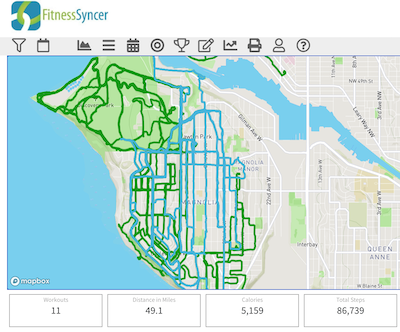
FitnessSyncer Maps displays your activities on a map, allowing you to see all of the places you have been so you can explore new paths.
FitnessSyncer Maps works on all of the data in FitnessSyncer. Hover your mouse on top of the map, the routes in that range will highlight, and the KPIs below the map will light up.
Alongside how many workouts, how far, the calories and the steps, the hover also says how long they took in all, their average heart rate, their average speed and how much they climbed. Routes overlap in see-through lines, so the places you go most often show darker. Color the routes by colors each route by its own average heart rate or average speed, from green at the lowest on the map to red at the highest.
To compare activities you have done on the same route, click the map where the route runs: the activities through that spot are ticked in Routes on This Map, where you can also tick them yourself. Select Compare the chosen activities to open them in FitnessSyncer Compare, lined up by distance.
FitnessSyncer Pro users can analyze any time range, while non-Pro users are limited to the Year to Date and the last 3 months.
FitnessSyncer Maps will help you find new ways to challenge yourself and celebrate your accomplishments.

