
FitnessSyncer Amazon S3, DropBox, Google Drive, and OneDrive Map-File Configuration
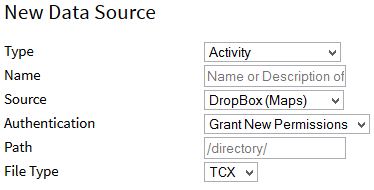
FitnessSyncer can create or read your health and fitness information in a FIT, GPX, KML, KMZ, PWX, TCX, or FitnessSyncer API (JSON) file format from Amazon S3, DropBox, Google Drive, OneDrive, or even e-mail. This is the easiest way to import files, export data, or back up your data. Here is how you configure it:
- Set the Path to the directory you wish for us to read files from or upload to
- Set the Filename format for us to upload. The extension is automatically provided.
- {date}: Date
- {year}: Year as a 4 digit entry
- {month}: Month
- {day}: Day
- {id}: Internal ID of the item
- {name}: Name of the activity
- {title}: Description of the activity
- Indicate the type of file. Which formats are available depends on the type of data being synced — Activities support every format, Weight and Blood Pressure support FIT and FitnessSyncer API, and every other data type supports FitnessSyncer API only.
The FitnessSyncer API format is a JSON representation of your data using the same structure as our public API's data types, and is the only format that supports every data type FitnessSyncer tracks; use it if you want a format that works regardless of which type of data you are syncing.
All other settings are just like the Sources or Destinations. These sources and destinations can also be edited from the FitnessSyncer App, except when configured for CSV.
Some services may produce a CSV which is a summary of an individual activity. For such services, you would use a Map configuration option. That said, some of the documentation for the CSV Configuration may be useful. Keep in mind that the extension for such files must be .csv.
For destination tasks, the CSV export here also can append existing files by selecting the Append File option. This helps create CSV files of your daily heart rate data into a monthly file. To configure one of these, ensure that you have the Append File option selected, use {year}-{month} as your filename, and filter out non-relevant sources or non-summary tasks.
To configure Amazon S3, place your Access Key into the username field, your Secret Key into the Password field, and for the path, use bucket/directory/file.
Can I import or export CSV data?
If you want the deep analytics of your routes, you can import or export these. This works similar to the Cloud Storage for CSV.
In addition, you can export the detailed Lap Summaries using this mechanism when you choose CSV Lap Summary. With this option, you cannot choose the columns included.
Can I use this for CSV activity summary files?
Some services produce a CSV that is a summary of an individual activity; these are also supported here. See the CSV Configuration documentation for additional detail. Note that the file extension must be .csv.
Can I recursively read files from cloud storage?
For Dropbox, append /** to the end of your path to recursively read a directory. For Amazon S3, recursive reading is the default behavior and cannot be disabled.
I cannot see my files in Dropbox Teams; why?
FitnessSyncer’s Dropbox integration does not work with Dropbox Teams as it is intended for personal usage. If you have questions on this, please contact us.


