
FitnessSyncer E-mail Task
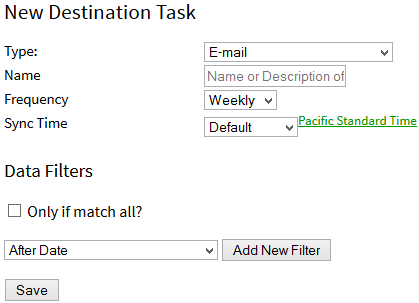
This task will e-mail you a summary of your data sources and include updates on your goals. To configure one of these tasks:
- From your Account, add a new destination task
- Type: Set the Type to E-mail
- Name: Describe your task. If left blank, FitnessSyncer will create a default.
- Frequency: Indicate how frequent you wish to receive this e-mail
- The ability to remove duplicated data source automatically.
- Sync Time: Specifies the time you wish to synchronize your data. This can be a specific time or hourly if you are a Pro user.
- Enabled: You must select the checkbox to use this destination. If this checkbox is not enabled, this destination will never run.
- Filters (in Advanced Options): You can filter the data read from this source in many ways; see the Filters section for more information. Note: This is not available within our Apps.
- Attachment: Include the raw GPX, TCX, KML, KMZ, PWX, or FIT files for your activities as attachments to your e-mail; we recommend this only for Daily Frequencies as the others, depending on your data, may exceed e-mail limits. Note: This is a Pro feature.
- Send to you and to: Choose another e-mail address to send the updates to. Note: This is a Pro feature.
- Message for Alternate Message: Provide a little context for this e-mail for the other receivers of this e-mail. Note: This is a Pro feature.
- Report: On an existing task, this link opens the e-mail summary report. The report is regenerated while you wait, so you don’t have to wait for the first e-mail to arrive to see what it will look like. A task that has never run previews the period that a run right now would cover.
On this page, the toolbar on existing tasks will contain these options:
- : Reset the Task
- : This icon shows you the e-mail in your web browser: the last one that was sent, or, if the task has not run yet, a preview of the one it will send. This takes a moment as it is regenerated while you wait. If you are using one of the FitnessSyncer Apps, the report is available as the Email Destination Summary Report.
- : Delete the Source and all of its data


