
FitnessSyncer Print
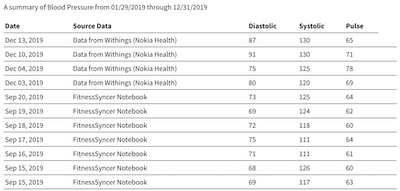
FitnessSyncer Print lists your readings for one type of data over a period you choose, ready to print, save as a PDF or download as a spreadsheet. It is the quickest way to bring your numbers to a doctor, coach, wellness provider, caretaker or anyone else, and it is free.
Quick Setups for an Appointment
At the top of the page, choose Blood Pressure, Glucose, Weight or Medication, and Print picks the fields a visit needs: the date and time of each reading, its values, the device or service it came from, and any note you added. Below them, choose the last 14, 30 or 90 days. The page reloads with your selection, and you can still change anything with the settings option.
Don’t need them? The in the corner takes the quick setups off the page, and the option in the toolbar brings them back. They are offered again the next time you open Print.
You can also start from your Dashboard: on the Blood Pressure, Diabetes and Body Composition reports, the For a visit option in the toolbar opens Print already set up for that report, over the same dates the report is showing. In the FitnessSyncer apps, the For a visit button sits above Share on those three reports.
If you have no readings in the period you chose but do have older ones, Print shows the same length of time up to your latest reading instead, and says so at the top, so the page is never empty when there is something to bring.
Medications, allergies and conditions list everything active at any time in the period, including anything started earlier and not yet stopped, rather than only what began in it.
The Summary
For blood pressure, glucose and weight, a short summary appears above the table, calculated from exactly the readings in it:
- Blood pressure: the number of readings, your average, your averages before and after noon, and your highest reading.
- Glucose: the number of readings, your average, and the share of your readings within the glucose range set in your preferences. Continuous glucose monitor data counts every value it recorded.
- Weight: your first and latest weights in the period, and the change between them.
Started a new medication, or wrote a note on one of your charts, during the period? Print lists them under the quick setups. Choose one, and the summary adds your average and the number of readings before it and after it, so the change is the first thing your doctor sees.
The summary shows your readings only, without interpretation, and is not intended for medical use.
Choosing Your Own Dates and Fields
Click the gear option at the top of the page to customize the dates, the type of data and the fields to be displayed. Choose your options, then click Apply, and the page will reload with your selected data.
Print, PDF or Spreadsheet
- Print: Choose the Print option within your browser. The toolbar and the quick setups are left off the printout.
- Download as PDF: The option in the toolbar prepares a PDF of exactly what is on the page, with your name, the date it was prepared and a FitnessSyncer header, ready to e-mail or bring along. It takes a few seconds to prepare.
- Download CSV: The option exports the same rows as a CSV file, ready to open in a spreadsheet or share as an attachment.
Want your doctor to receive it every month without you having to remember? With FitnessSyncer Pro, a PDF report by e-mail can send your Blood Pressure or Diabetes report on the first of every month.
Want to share it electronically? No problem, take a look at our Sharing Capabilities, a great way to share your data in the same way you see it.

