| ||||||||||||||||||||||||
And there are big changes coming as Google Fit and Fitbit move to Google Health. | ||||||||||||||||||||||||
New for every account 11 Reports, Ready When You Sign InWe’re making it easier to understand your data. FitnessSyncer now includes a collection of ready-made reports that open with your own data. They are available to every account, including the free tier, on the web and in both mobile apps.

Trends compares your most recent four weeks with the previous three months, highlighting only the changes that are both statistically significant and large enough to matter. If you subscribe to email updates, it now appears at the top of each email. Goals shows your progress against the targets you set. For recurring goals, such as a daily step target, it shows how often you met the goal, your current streak, and your best streak. For fixed targets, such as a weight goal, it estimates when you may reach it based on your current rate of progress. Learn more → The Diabetes and Glucose report estimates your A1C from recent readings or tells you when there is not enough data to make a reliable estimate. You can also set your personal glucose range in your Profile, so charts and bands reflect your own targets rather than general-population ranges. The Sleep Quality report displays recent nights side by side as stage-based bands, making deep sleep, REM, light sleep, and awake periods easy to scan. | ||||||||||||||||||||||||
For FitnessSyncer Pro A Larger Chart Editor with Preview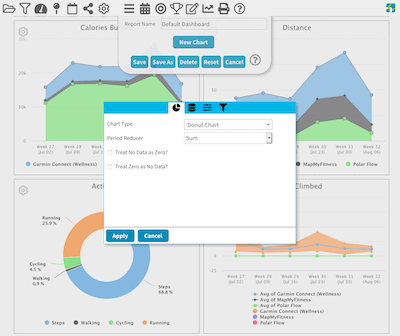
We have revamped our Chart Editor for FitnessSyncer Pro subscribers. Now you can easily search for all of the chart options, change any option, press Preview, and see the result. The new editor is also where you create the recently added Pivot Charts and Pivot Tables. Each one needs a Row, a Column, and Values, which the full-screen editor makes far easier to set up, and they can now add interactive Filters to your Dashboards. | ||||||||||||||||||||||||
Also on the Dashboard More From Your Dashboard
| ||||||||||||||||||||||||
New view Weekly Calendars
The Calendar has always offered a monthly view. Now it also offers a weekly view, displaying seven days in sequence with each day’s recorded data listed beneath it. Choose the view you prefer and FitnessSyncer will remember it the next time you return. The summary below the calendar follows your selection, too, covering the full week when you are using weekly view. The Calendar also handles high-volume days more cleanly. If you use a continuous glucose monitor, for example, a day may contain 30 readings. Instead of displaying 30 nearly identical rows, FitnessSyncer collapses them into a count that you can select to view each reading and its timestamp. | ||||||||||||||||||||||||
New Compare, Side by Side
Compare two or more items side by side to understand what changed. It works with nearly anything you track, not just workouts, and provides a column chart for every metric recorded by that item type. For activities with recorded tracks, Compare also overlays line charts for metrics such as heart rate, pace, power, cadence, and more. Single readings now include useful context, too. Whether you are comparing glucose, blood pressure, oxygen, temperature, or cholesterol readings, FitnessSyncer can show:
Where established ranges exist, shaded bands help explain what readings mean. These include your personal in-range glucose limits, standard blood-pressure categories, and new bands for temperature, cholesterol, resting heart rate, and sleep duration. They provide context, not a diagnosis. | ||||||||||||||||||||||||
Rebuilt Leaderboards, Rebuilt for CompetitionEvery Leaderboard now says how it is won: the most in total, the best single result, the biggest change, or, for measurements such as weight or resting heart rate, the lowest. A new Standings view shows your place, the gap to the people around you, how you moved since the last period, and when it was last updated. Points boards can combine several kinds of data, with a daily limit and ready-made scoring presets, and any board can be run as a team competition. They work in the FitnessSyncer apps, too. | ||||||||||||||||||||||||
Connect more 10 New IntegrationsWe’re excited — hello and welcome to the 10 new services joining our roster! Hevy is especially notable because it brings strength-training data into FitnessSyncer at the exercise level. Each exercise in a workout arrives as its own activity, including repetitions, heaviest set, and perceived effort. That means you can chart a bench press independently instead of losing it within an overall workout total. Hevy uses an API key from your Hevy settings rather than the standard sign-in flow. The Hevy FAQ explains how to connect it. FitnessSyncer can now also import Da Fit files. We are always adding providers. If yours is not listed, please get in touch. You may also be able to transfer data through a bridge service; see our Bridge Documentation for options. See the full list → | ||||||||||||||||||||||||
New data types Cycle Tracking and ECGTwo new data types are now available everywhere FitnessSyncer works: on the web, in FitnessSyncer for Android, and in FitnessSyncer for iOS. 
Cycle Tracking includes flow, basal body temperature, cervical mucus, and ovulation tests. Data can be read from and written to Apple Health and Google Health Connect, or entered manually in FitnessSyncer Notebook. Cycle Tracking also has its own ready-made report. 
ECG recordings can sync from Apple Health, Withings, Google Health, and other connected ECG-capable devices. FitnessSyncer includes the waveform, the classification reported by the source device, and any symptoms recorded at the time. An ECG report also summarizes your recordings by classification. Device classifications are provided by the device that created the recording and are not intended for diagnostic use. | ||||||||||||||||||||||||
Coming soon Google Health MigrationGoogle is retiring the older APIs used by Google Fit and Fitbit. To prepare, we have built a replacement connection that links FitnessSyncer’s servers directly with Google’s systems. It is currently in beta testing, and we will email everyone using an affected service as soon as it is ready. A migration wizard will guide you through the process. It reviews your current Fitbit and Google Fit sources and destinations, shows what each connection will support after migration, and lets you choose what to move. Your history, source name, filters, and settings will be retained. Only the connection changes, and any destination tasks using it will continue to work. Existing connections will continue syncing until Google disables the older APIs, so there is no immediate deadline. However, migrating sooner means there is less to do later. If you already sync through the Android app and Google Health Connect, no action is required; you can continue using either or both. Android users do not need to wait for the wizard. Update FitnessSyncer for Android and you can use Google Health anywhere you currently use Google Fit or Fitbit. The wizard will simplify migration, but the new option is available now. | ||||||||||||||||||||||||
Update now App Improvements for Phones and TabletsWe have been especially busy improving the apps. For the best experience, update to the latest version. Everything added to the website is now available in the apps, including Cycle Tracking, ECG, ready-made reports, Pivot Table filters, and access to the FitnessSyncer Calendar, Notebook, Maps, Print, and Daily Analyzer. You can also choose which reports and Notebook categories appear in your tabs, freeing up space for the tools you use most.
These updates also include a bunch of stability and performance improvements.
| ||||||||||||||||||||||||
For everyone Accessibility, However You Use FitnessSyncerYou can now use FitnessSyncer.com entirely with a keyboard or a screen reader, and every chart includes a Show the data table button that opens its data as a sortable table. Both mobile apps have also received a comprehensive accessibility update for VoiceOver, TalkBack, and larger text. If you have any recommendations, please let us know so that we can improve the experience! | ||||||||||||||||||||||||
Now on the website We Speak 27 LanguagesThe website now follows the language you choose, just as the apps do, across the Dashboard, Stream, and settings. For emails, choose your language under General Settings. Thirteen languages have just been added, bringing the total to 27: Brazilian Portuguese, Czech, Finnish, Greek, Hungarian, Indonesian, Romanian, Russian, Slovak, Slovenian, Traditional Chinese, Turkish, and Ukrainian.
If you notice any incorrect text or translations in your language, please let us know. You can choose the language used for email under General Settings. | ||||||||||||||||||||||||
More to ComeSince founding FitnessSyncer in 2012, we’ve watched the health and fitness tracking space grow and change dramatically, and we’ve evolved right along with it. Our goal hasn’t changed: make your data work for you, so you can focus on you. Thank you for your support, your feedback, and for being part of our community. | ||||||||||||||||||||||||
|

 Hammerhead
 Hevy
Hevy Keto-Mojo
 Morpheus
 Nolio
Nolio Rouvy
Rouvy TrainingMonkeys
 Ultrahuman
 Wahoo
Wahoo Zepp Amazfit



