
Bring Your Past Data to FitnessSyncer
A new account usually means an empty chart. It does not here. When you connect a service to FitnessSyncer, we bring across the history it has been keeping for you, so your first dashboard has years in it rather than hours. You do not have to stop using that service, or any of them, for this to be worth doing: the point is to have your whole record in one place and keep it there.
How much arrives is decided by the service, not by us. Some hand over everything they hold the first time we ask. Others hand over a recent window and keep the rest behind a second request, which is what a Historic Sync is for. A few keep nothing at all for us to ask for, and for those there is a file route at the bottom of this page.
- Every account, free included, gets your recent history on each service you connect. For most services that is about the last 90 days.
- A Historic Sync goes back for the rest, and it is the one part of this that needs FitnessSyncer Pro. Most services support it.
- Anything we cannot reach, you can still bring in yourself as files you export from the old service.
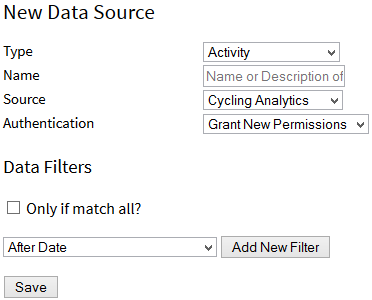
A Historic Sync is started from the source itself, on the website or in either app, and you pick the range you want and whether we e-mail you when it is done.
Your Fitbit history
Connect Fitbit and about 30 days arrive straight away, on any account. A Pro Historic Sync then brings everything Fitbit has kept, which for a long-standing account is usually every day since you set up your first tracker.
Steps, sleep, weight, heart rate, activities and food all come across, into a dashboard that stays yours whether or not you stay with the tracker. The Fitbit FAQ has the detail.
Your Garmin Connect history
Garmin is the one service where the ceiling is worth knowing up front. A Pro Historic Sync reaches up to 5 years of activities and 2 years of health metrics, which is as far back as Garmin lets anyone go, ourselves included. Check that you granted access to Historical Data when you connected, because without it nothing older arrives at all.
If your Garmin history runs deeper than that, it is still recoverable. Garmin will export a summary CSV of your activities, or your whole account on request, and either can be uploaded to FitnessSyncer Notebook; FIT files already on your computer can come in through FitnessSyncer Uploader. The Garmin Connect FAQ has the steps for each.
Your Samsung Health history
Samsung Health keeps its data on your phone, so everything it has kept there can come across, including the years that predate FitnessSyncer, with a Pro Historic Sync.
Because it is read from the phone rather than from a server, keep the FitnessSyncer app in the foreground with the screen on while that first sync runs. Apple Health and Google Health Connect work the same way, and on all three, check that you allowed access to past data when you first connected. The Samsung Health page has the rest.
Your Google Fit history
Connect Google Fit and about 90 days arrive on any account; a Pro Historic Sync brings the rest of what Google Fit has kept. This is the one most worth doing sooner rather than later, because the history lasts only as long as the account does.
If your phone has moved on to Google Health Connect, connect that as well, and read the Google Health Connect page. The two hold different things, and bringing both in is how you end up with one unbroken record rather than two halves. See also the Google Fit FAQ.
What arrives from which service
Every one of the services we read falls into one of three groups. If yours is not named in the first two, it is in the third.
Everything, as soon as you connect
These hand over the whole of what they hold on an ordinary sync, so there is nothing else to do and nothing to pay for. You connect them and your history is simply there.
- 2Peak
- Concept2 Logbook
- Cycling Analytics
- Decathlon Coach
- Decathlon Coach (CN)
- Hexoskin
- Jade Diabetes
- Omron
- Omron (EU)
- Pulsstory
- Ride with GPS
- Sleep as Android
- Tidepool
- TrainAsONE
- Tredict
- Ultrahuman
- VitaDock
- Whoop
- Xhale
Your recent history now, the rest with Pro
These give us a recent window when you connect, usually about the last 90 days, which every account gets free. Going back for the rest is a Pro Historic Sync. Each service’s own page has the detail for it.
- Apple Health
- Coros
- fatsecret
- Fitbit
- Google Fit
- Google Health Connect
- Hammerhead
- HealthPlanet
- Hevy
- Huawei Health
- iHealth
- iHealth (EU)
- Intervals.icu
- Keto-Mojo (Beta)
- Keto-Mojo (Canada) (Beta)
- Keto-Mojo (EU) (Beta)
- MapMyFitness
- Morpheus
- Nolio
- Oura
- RunKeeper
- Samsung Health
- Smashrun
- SportTracks
- Strava
- Suunto App
- TrainingMonkeys
- TrainingPeaks
- UnderAmour
- Wahoo
- Withings
- Xert
- Zepp
Services with a ceiling, and how to get past it
On these, something stops a sync short, so even a Pro Historic Sync will not bring everything however long you leave it running. For most of them that is not the end of the story. Two will export the rest of your history as files you upload, and the last column is the one to read.
| Service | How far back a Historic Sync reaches | Another way to get the rest |
|---|---|---|
| Garmin Connect | Up to 5 years of activities and 2 years of health metrics. | Garmin exports a summary CSV, or your whole account on request, for upload to FitnessSyncer Notebook. FIT files already on your computer come in through FitnessSyncer Uploader. |
| Garmin Connect [China] | Up to 5 years of activities and 2 years of health metrics. | Garmin exports a summary CSV, or your whole account on request, for upload to FitnessSyncer Notebook. FIT files already on your computer come in through FitnessSyncer Uploader. |
| Polar Flow | The last 30 days, or since you connected, whichever is less. Polar hands over nothing from before you connected. | All of it, by hand: Polar Flow exports your whole history as a ZIP from account.polar.com. Unzip it and upload the files to FitnessSyncer Notebook. |
| Rouvy | Back to January 1, 2023. | |
| Dexcom CGM | Not available. Your data starts from the day you connect. | |
| BodyTrace | Not available. Your data starts from the day you connect. | |
| Emfit | Not available. Your data starts from the day you connect. |
A service that is not in this table either hands over everything it has kept on a Historic Sync, or had nothing left to fetch after a standard sync. The Historic Sync page says which is which.
When a service will not hand it over
Some services keep nothing from before the day you connect, some put a ceiling on how far a Historic Sync can reach, and some accounts are closed already. None of those is the end of it, because FitnessSyncer reads files as well as services, and nearly every platform will export your history if you ask it to. There are five ways in, and which one you want depends on what the export looks like.
- Upload it to FitnessSyncer Notebook. The simplest route and the right one for a one-off backfill, because there is nothing to set up: pick the files and they are read. This is what the Polar and Garmin FAQs point you at for an account export.
- Let FitnessSyncer Uploader do it. If the files are already on your computer, such as FIT files from an ANT stick or a folder a desktop tool writes to, FitnessSyncer Uploader sends them for you, and keeps doing it.
- Put them in your own cloud storage. A folder on Amazon S3, DropBox, Google Drive or OneDrive is watched, so FIT, GPX, KML, KMZ, PWX, TCX and FitnessSyncer JSON files are read as they appear. Best when the exports keep coming rather than arriving once.
- E-mail them in. Send the export to your own FitnessSyncer address, which suits a one-off you would rather not store anywhere first.
- Describe a CSV once. When the export is a spreadsheet rather than activity files, you tell us which column is which and we remember it. Accupedo, Basis Peak and Da Fit exports are recognized without any of that, because we already have their formats.
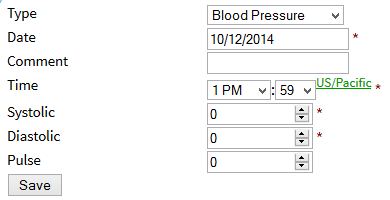
A file import is not a lesser route. The data lands in the same place, charts the same way and feeds the same destinations as anything read from a live service.
Where a service will give us the data directly, let it. A GPX or TCX export carries far less than our own read of the same activity, so uploading files from a service you could simply connect will cost you detail. The file routes are for history a service will not hand over, not a replacement for one that will.
If the history is on a device rather than in a service, My device is not listed covers the same ground from the device end, including which exports we already recognize by name.
Once your history is in
- Check it for gaps. Open your Dashboard, set the dates to the range you brought in, and look for holes. Re-running a Historic Sync over a gap is safe.
- Send it on if you want it elsewhere. A destination only sees data that arrives after it was set up, so reset the destination to push your newly arrived history to it.
- Give it time. Years of data is a lot to read, and a Historic Sync can take minutes or days depending on the service and how much there is. We will e-mail you when it finishes if you ask us to.
- Re-running it is free once you are Pro. A Historic Sync is not a one-off purchase or a credit you spend, so you can run it again per source, over a gap, or after you reconnect a service.
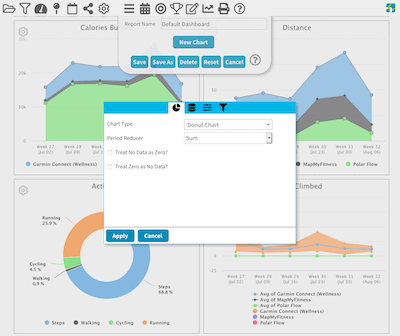
A Historic Sync is a Pro feature, and bringing a decade of training into one place is what most people go Pro for. Your recent history, on every service you connect, is free and stays free.